Tables with a variable number of rows
Acts, invoices and dispatch notes list as many services or goods as the deal has. Add and remove rows while filling; the table grows to match.
The problem it solves
An act of works lists the services provided. Last month there were two, this month there are seven. An invoice, a dispatch note, a specification or a ТТН (consignment note) is the same: a table whose number of rows is different every time.
A template cannot know in advance how many rows you will need, so DocuTract treats such a table as a list: the template describes one row, and while filling you add as many rows as the document needs. Every row becomes a line of the table in the finished document.
Filling a list
On the data review step, a list appears below the ordinary fields. Each row is a card with the row's fields: for example the name of the service, the unit, the quantity, the price and the amount.
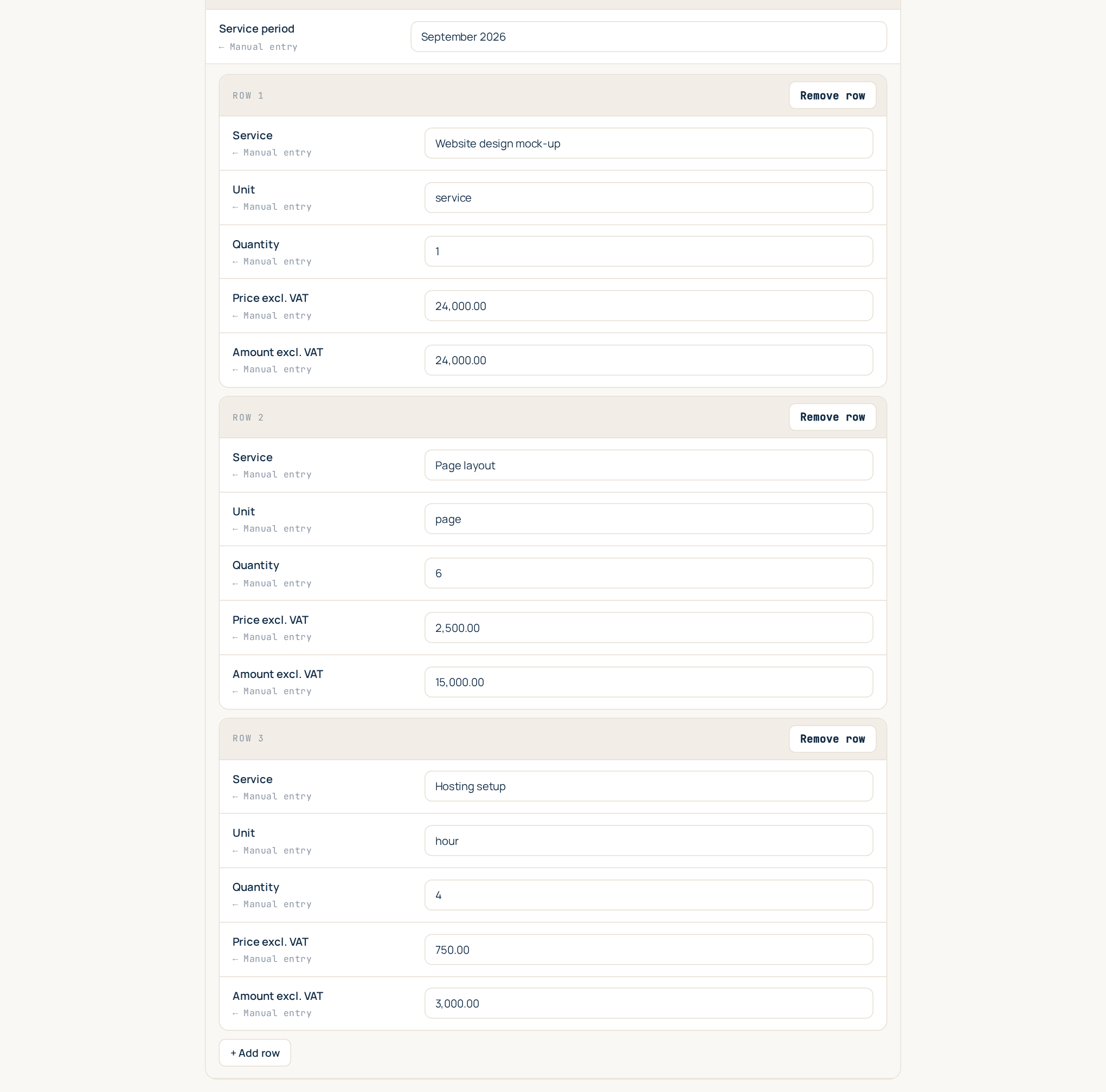
- Add row adds an empty card at the end of the list. Fill in its fields.
- Remove row on a card deletes that row.
- If the list is empty you see "No rows yet - add the first one."
- Rows are numbered automatically: the № column of the table is filled 1, 2, 3… in the order of the cards, so you never renumber anything after removing a row.
A list can hold up to 200 rows. That is plenty for a document; if you really need more, it is probably a spreadsheet rather than a document.
Totals are ordinary fields
The total, the VAT and the total in words are separate fields outside the list. DocuTract does not add up the rows for you: you fill the totals yourself, just as you would sign off on them, so check them against the rows before you generate.
An empty list
If you remove every row, the table row that held the list is removed from the document entirely: no empty line with a lonely "1" in it. The table's header and its total rows stay.
For template authors
Writing a list into a blank
Put the list's placeholders in one row of a Word table, using the dotted form
list.column:
| № | Service | Unit | Qty | Price | Amount |
|---|---|---|---|---|---|
{{items.#}} |
{{items.name}} |
{{items.unit}} |
{{items.qty}} |
{{items.price}} |
{{items.amount}} |
- The part before the dot (
items) names the list. Every placeholder with the same prefix belongs to the same row. - The part after the dot names the column. Use lowercase Latin letters and underscores, as for any placeholder.
{{items.#}}is the row number. It is not a field: it is filled automatically.- Keep the whole row in one table row. The rows above (the header) and below (the totals) are left as they are.
- A document can have more than one list, for example
{{goods.…}}and{{services.…}}, each in its own table row.
When you upload the blank, the list's columns appear in the field mapping like ordinary fields.
The wizard does it for you
If you create a template from a finished act or invoice, you do not have to write any of this. The wizard recognises the item table, turns the example lines into one repeatable row with a field per column and adds the row number. See Create a template from a finished document.
Lists and repeated sections are different things
A dotted placeholder is also used inside a repeated section, {{#each tenants}}
… {{tenants.full_name}}, whose copies come from scans (one per tenant's passport). A list is
filled by hand, row by row. If a prefix is the name of an each block, it is a repeated section;
otherwise it is a list. See Conditional blocks and template versions.
Ready templates with lists
The library templates for an act of works, an invoice, a dispatch note, a supply contract with its specification, a commercial offer and the ТТН already have their item tables set up as lists. See Ready-made templates.