API and webhooks
Connect your own system to DocuTract: issue a token for the API, and have us notify your address when a document is ready or something needs attention.
Where to find it
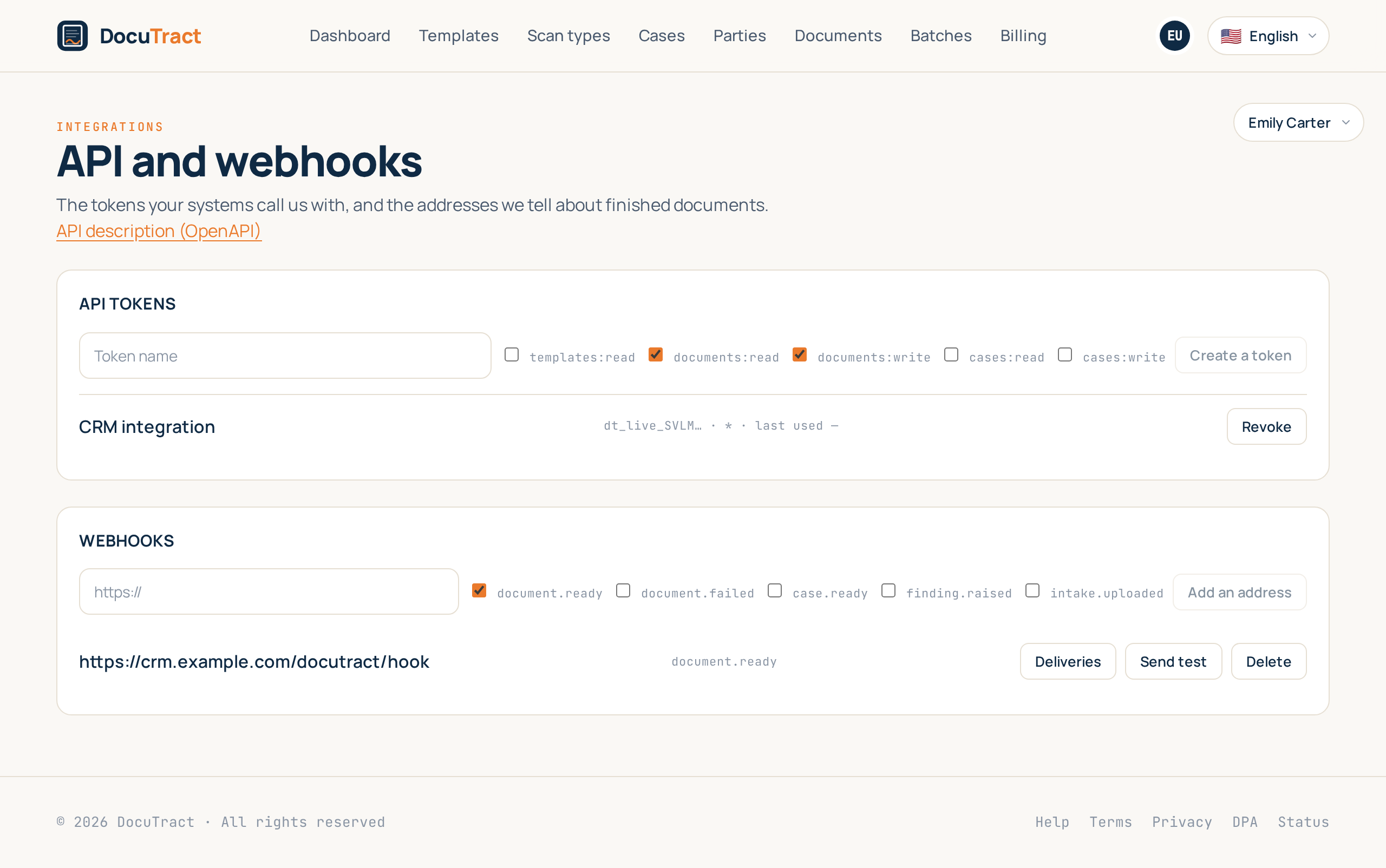
If documents in your office start somewhere other than DocuTract, that system can talk to us directly. Open the menu with your address in the top right corner and choose Integrations: that is where a token is issued for your system to call us with, and where you add the address we tell it about finished documents on.
The screen starts with ready-made CRM connections (CRM integrations); the tokens and webhooks described here are below them, in the API and webhooks section.
The token
Press Create a token, give it a name you will recognise later (so you know which system is using it), and tick what it is allowed to do: read templates, create documents, work with cases.
The token itself is shown once, right after it is created: we store only a hash of it, so showing it a second time is something even we cannot do. Copy it straight into your system's settings.
The list shows the first characters of each token, what it may do, and when it was last used. Revoke switches a token off immediately; the record of it stays, so it is visible that it existed and when it stopped working.
What the API can do
Your system can:
- open a case and upload scans into it;
- create a document from a template with the values already filled in;
- ask what stage a document has reached;
- take every value together with the scan each one was read from;
- get a short-lived link to the finished file.
The full description of every address and field is generated from the code itself and published openly: the API description.
Webhooks
Instead of asking us whether a document is ready, give us an address and we will write to you. Add it under Webhooks and tick the events: document ready, document failed, case ready, a disagreement found, a client sent a file.
Every request is signed with the X-DocuTract-Signature header, and the secret that verifies the
signature is shown once, like the token. Your system has to check the signature and answer with a 2xx
code. If it answers anything else, or does not answer at all, we try again: after a minute, after
five, after half an hour, after two hours and after ten, and then we stop.
When something did not arrive
The Deliveries button shows the log: which event we sent, when, how many times, what response code came back and the beginning of the response body. That is the answer to «our system received nothing»: it is there in writing that it answered 500 four times at 14:12.
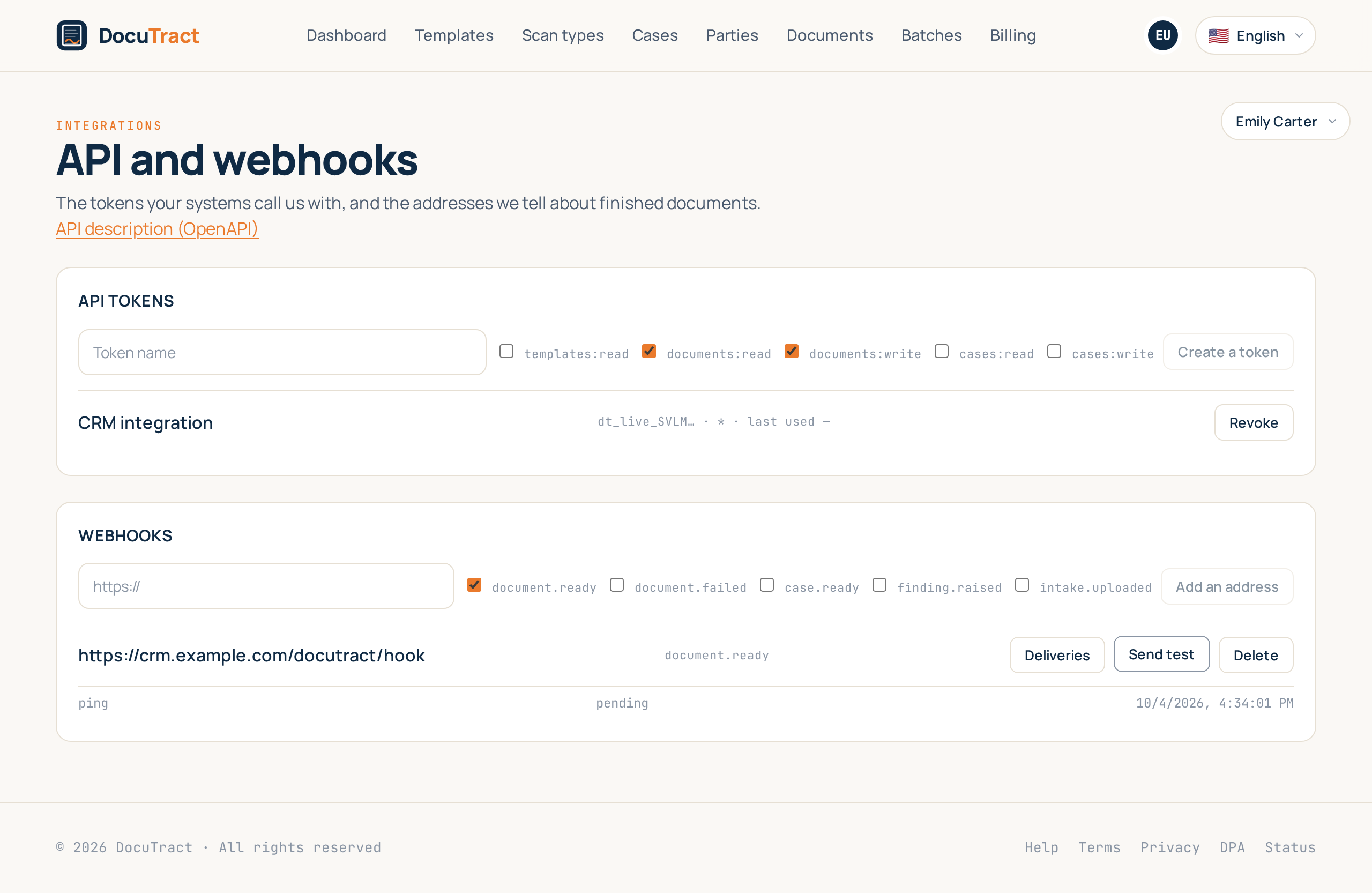
Send test posts a ping to the address right now, without waiting for a real event, so a receiver
can be set up before any work goes through it. Retry, beside a failed delivery, makes one more
attempt immediately.
Zapier, Make and n8n
No-code platforms subscribe to our events by themselves, through the REST hooks part of the API, so
nobody has to copy their addresses into DocuTract. Give the platform a token with the
webhooks:read and webhooks:write scopes, plus whatever its actions need (for example
templates:read and documents:write).
POST /api/v1/hookswith{"event": "document.ready", "target_url": "https://…"}subscribes an address to one event. The answer carries the subscription'sidand, once, its signingsecret.GET /api/v1/hookslists the subscriptions made this way;DELETE /api/v1/hooks/{id}removes one.GET /api/v1/hooks/eventslists the events:document.ready,document.failed,case.ready,finding.raised,intake.uploaded.GET /api/v1/hooks/samples/{event}returns an example payload, which the platform shows in its "test trigger" before any real event has happened.
A subscription is an ordinary webhook address: signed, retried and logged in the same way, and
visible in the list under Webhooks. It stops when the token that created it is revoked or
expires, or when the platform answers a delivery with 410 Gone.
What document.ready looks like:
{
  "document_id": "00000000-0000-4000-8000-000000000001",
  "reference": "DOC-26-0001",
  "template_id": "00000000-0000-4000-8000-000000000002",
  "template_version": 1,
  "event": "document.ready",
  "occurred_at": "2026-01-15T10:30:00+00:00"
}
and case.ready:
{
  "case_id": "00000000-0000-4000-8000-000000000003",
  "title": "Sample case",
  "documents": [
    { "id": "00000000-0000-4000-8000-000000000001", "reference": "DOC-26-0001" }
  ],
  "event": "case.ready",
  "occurred_at": "2026-01-15T10:30:00+00:00"
}
The fields of a template
GET /api/v1/templates/{id}/fields (scope templates:read) lists what a template needs: each
field's key (what values in POST /api/v1/documents is keyed by), its label, where it is
filled from, and fillable, which is false for a field DocuTract fills itself, such as a date. A
form in Zapier or Make is built from this list, so it always matches the template as it is now.
Lookups
A few calls exist so that a system, or a no-code platform, can find what it needs without guessing:
GET /api/v1/me(no scope) returns the workspace the token belongs to, its plan and the token's own name and scopes. It is the cheapest way to check that a token works.GET /api/v1/documents(scopedocuments:read) lists the newest documents first. Narrow it withreference(the exact DOC-… reference),statusortemplate_id;limittakes up to 100, 25 by default.GET /api/v1/cases(scopecases:read) lists the newest cases, optionally only those in onestatus, with the samelimit. Every case now also carries itscreated_at.GET /api/v1/case-types(scopecases:read) lists the case types a case can be opened from.GET /api/v1/templates?name=…keeps only the templates whose name contains the text, ignoring case.
There is no paging on purpose: these lists are for finding the latest items, not for exporting a workspace.
Which plan
The API and webhooks are part of the Team plan. On any other plan the tokens and addresses you already created stay visible and can be revoked, but new ones are not issued, and calls made with a token are no longer served. Compare plans on the pricing page.