Conditional blocks and template versions
Keep one template for many variants: clauses that appear only when they apply, sections repeated per person, and a version recorded on every document.
One template instead of five
A real contract is not fixed text. A clause about a guarantor belongs in the lease that has one and nowhere else; a signature section appears once per tenant. Rather than keeping five near-identical templates, mark the blocks in the blank and say when each applies.
Marking a block
In Word, wrap the part that is conditional:
{{#if guarantor}}
5. The guarantor answers for the tenant's obligations.
{{/if}}
{{else}} is allowed between them, for the wording that applies when the condition does not hold.
To repeat a section, wrap it in {{#each tenants}} and {{/each}} and use
{{tenants.full_name}} inside. The section is repeated once per scan it runs over: one signature
block per tenant's passport, for example.
Put the markers on their own lines. A whole paragraph is removed with the block, which is what lets Word renumber the clauses by itself.
A repeated section is not the same as a table whose rows you add by hand (the services of an act, the goods of an invoice). For those, see Tables with a variable number of rows.
Saying when it applies
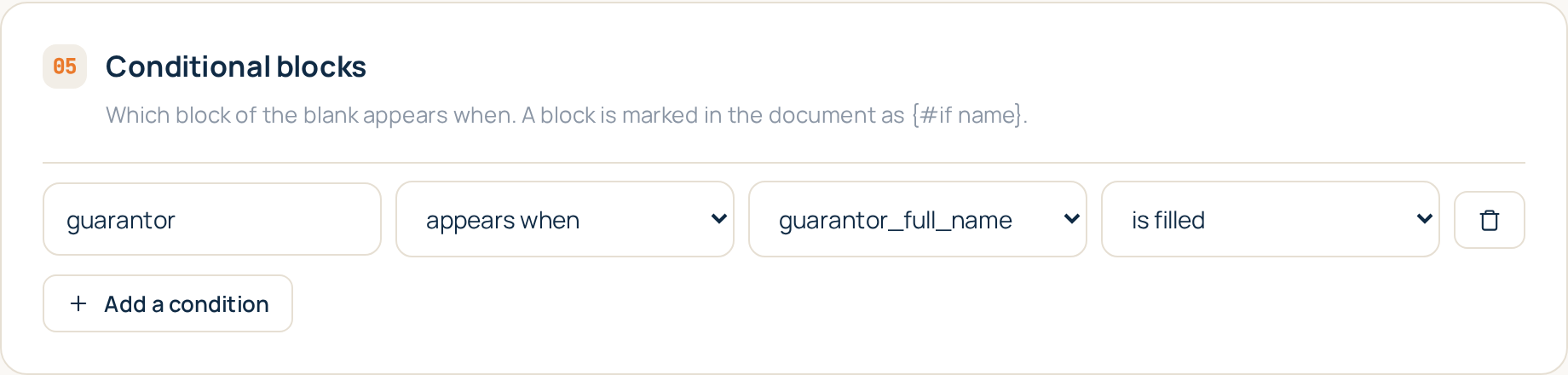
In the template editor, the Conditional blocks section lists one rule per block: the block name as you wrote it in the blank, and what has to be true. A rule is dropdowns, not a formula:
- a field is filled;
- a field is empty;
- a field equals something;
- a field is greater or less than a number or a date.
For a repeated block you pick which scans it repeats over.
A block with no rule is treated as absent, so a mistyped name removes a clause rather than silently including one. That is deliberate: a missing paragraph gets noticed, an extra one does not.
Versions
Anything that changes what comes out of a generation gives the template a new version:
- a new blank;
- a changed mapping;
- a changed condition.
Renaming a template does not.
Each document records the version it was built with, shown in the documents list. That is the answer to "why does this contract read differently from the one we did last month" long after the template has moved on.
Tips
- Test both branches. After adding a condition, fill one document where it holds and one where it does not, and read both.
- Name blocks after what they mean.
guarantororvat_payerreads better in the rules list thanblock1.